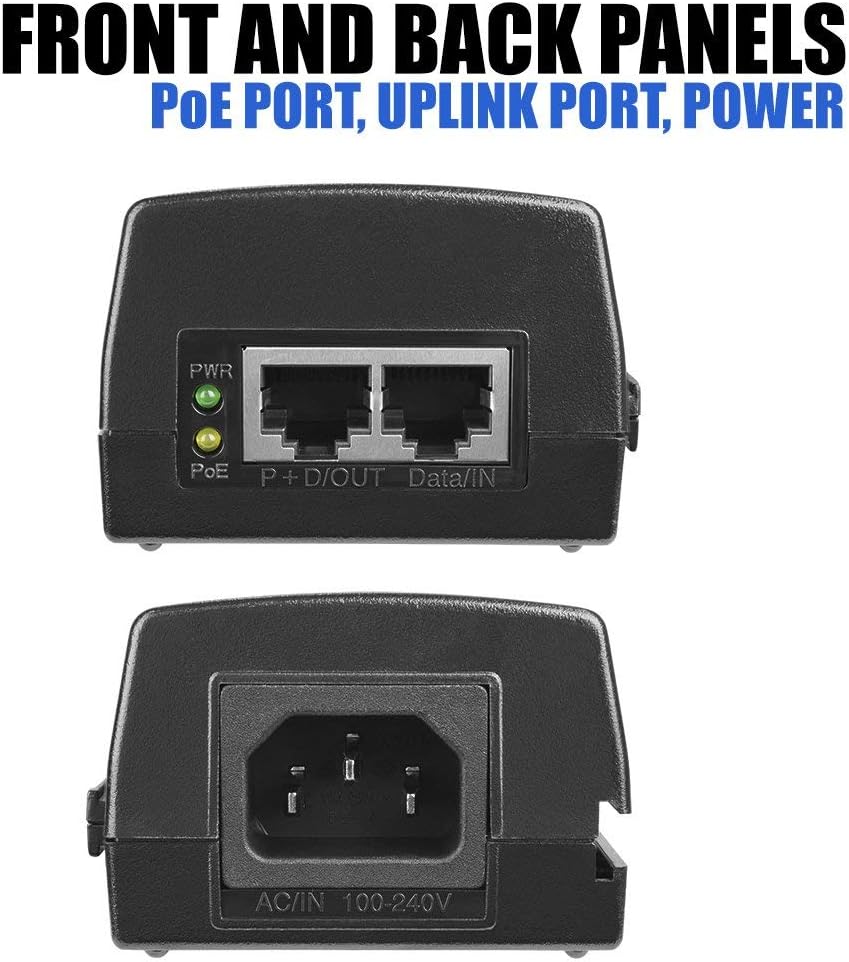
You just finished running a single Cat5e cable to the corner of the parking lot, and now you’re staring at the back of your new IP camera wondering why it won’t power on. The answer is almost certainly this: that camera runs on something called PoE — Power over Ethernet — which means it expects to receive electrical power through the same network cable that carries video data. No separate power outlet required, which is the whole reason you chose a PoE camera. The catch? Something on the other end of that cable has to supply that power, and if your existing network switch (the box that connects all your wired devices) doesn’t support PoE, the camera just sits there blinking at you.
The fix doesn’t have to be a full PoE switch replacement. For one camera — or even two or three scattered across a building — a PoE injector (sometimes called a “midspan”) is a small pass-through device that plugs into a standard wall outlet and “injects” power into your Ethernet cable. It sits between your normal switch and your camera, costs $15–$60 depending on the power standard it supports, and adds exactly one camera port to your PoE-capable infrastructure without touching anything else. This guide explains which injector to buy, which spec to match to your camera, and exactly when a switch upgrade makes more sense than stacking injectors.
The PoE Standard Is the Only Spec That Actually Matters
Before you buy anything, check your camera’s documentation for its PoE class. The IEEE 802.3 working group (the body that defines network standards) has published three generations of PoE specification, and they are not interchangeable:
| Standard | Common Name | Max Power Delivered | Typical Camera Type |
|---|---|---|---|
| IEEE 802.3af | PoE | 15.4 W (12.95 W at device) | Fixed lens cameras, basic PTZ |
| IEEE 802.3at | PoE+ | 30 W (25.5 W at device) | Pan-tilt-zoom, cameras with heaters |
| IEEE 802.3bt | PoE++ / 4PPoE | 60–90 W | Multi-sensor, LiDAR, access panels |
The numbers in the “at device” column matter more than the maximums — cable resistance eats some of the power before it reaches your camera. Per IEEE 802.3 documentation, a 100-meter Cat5e run can absorb 2–3 watts in transit, which is why manufacturers rate cameras at their consumption floor, not the injector’s ceiling.
IPVM’s PoE Standards and Power Budgets Reference Guide makes an important practical note that integrators learn to internalize: cameras with motorized varifocal lenses and IR illuminators routinely spike past their rated wattage during startup, especially in cold weather. A camera rated at 12W may draw 14–15W for the first 30 seconds. Buy an injector with headroom, not one matched exactly to the nameplate wattage.
Decision rule #1: If your camera is rated under 13W, 802.3af is fine. Between 13W and 25W, specify 802.3at (PoE+). Anything above 25W — multi-imager domes, PTZ cameras with integral heaters, Axis P-series multi-sensor units — requires 802.3bt. Buying down to save $8 is the most common field mistake.
Single-Port Injectors vs. Multi-Port Midspans: The Math That Decides It
Single-port PoE injectors are the obvious choice for one camera. But as soon as you have three or more cameras running through the same switch, the per-unit economics flip.
By the numbers:
- Single-port 802.3at injector (e.g., TP-Link TL-PoE150S): ~$18–$22 street price as of mid-2026
- 8-port PoE+ unmanaged switch (e.g., TP-Link TL-SG1008P): ~$55–$70 street price as of mid-2026
- Break-even point: approximately 3 cameras, assuming comparable power budgets
Security Sales & Integration’s infrastructure fundamentals coverage notes that integrators frequently encounter existing non-PoE switches in SMB retrofits — switches with remaining years of life and no business case for replacement. In those scenarios, stacking two or three injectors is economically rational. Beyond that threshold, a dedicated PoE switch is almost always the cleaner and cheaper solution long-term, and it centralizes your power budget into one auditable device.
Decision rule #2: One or two isolated cameras on a legacy non-PoE switch → injectors. Three or more cameras, or cameras in a shared closet → price a PoE switch first. The switch almost always wins at four cameras.
What to Actually Look for on the Spec Sheet
Once you’ve confirmed the right PoE standard, three secondary specs separate the injectors worth buying from the ones that fail at six months:
1. Power Budget vs. Port Wattage Rating
Some budget injectors are labeled 802.3at but are thermally limited to 15–18W sustained output, not the 30W the spec allows. PCMag’s networking hardware coverage has flagged this pattern repeatedly in sub-$15 units — the chip is spec-compliant on paper but the thermal design can’t sustain peak draw over hours of continuous operation. Look for injectors from vendors who publish a sustained power rating, not just a peak or theoretical maximum.
Reputable injectors in the 2025–2026 market from vendors like TP-Link, Phihong, and Tycon Systems publish sustained wattage figures alongside peak ratings. Phihong in particular is well-documented in IPVM’s hardware coverage as an OEM supplier to major camera brands, which means their injectors are engineered to the same tolerances as the cameras consuming their power.
2. Passive vs. Active (Standard-Compliant) PoE
This distinction matters enormously and gets glossed over in most buying guides. Active PoE injectors negotiate power delivery with the camera before sending any voltage — this is how 802.3af/at/bt are supposed to work, and it’s what protects non-PoE devices from frying if someone accidentally plugs the wrong thing in. Passive PoE injectors (common in sub-$10 units and in Ubiquiti’s legacy product line) simply push voltage onto the wire without negotiation. They work fine with cameras designed to accept passive PoE, and they can destroy cameras or switches that aren’t.
TechRadar’s networking buying guides consistently flag passive PoE as the leading cause of accidental hardware damage in DIY installations. Unless your camera’s documentation explicitly lists passive PoE as acceptable (and you can verify the voltage match), buy an active, standard-compliant injector. The $5 savings is not worth the risk.
3. Gigabit vs. Fast Ethernet Data Path
This matters more in 2026 than it did five years ago. Modern IP cameras — particularly 4K and multi-imager units — can push 8–15 Mbps per channel under continuous recording. A 100 Mbps (Fast Ethernet) injector won’t bottleneck most individual cameras, but if you’re running a high-bitrate 4K camera with H.264 at maximum quality settings, Gigabit data path gives you headroom. Gigabit injectors now cost only $3–$5 more than Fast Ethernet equivalents. Buy Gigabit by default unless you have a specific reason not to.
Installation Reality Check: What the Product Listing Won’t Tell You
A PoE injector has two Ethernet ports and one power plug. Port labeled “Data In” (or “LAN”) goes to your existing switch. Port labeled “PoE Out” (or “Camera”) goes to your camera. Power brick goes to the wall. The camera should boot within 30–60 seconds. That’s the whole installation.
What the listing won’t tell you:
Cable quality matters. Injectors assume Cat5e or better with proper terminations. A poorly crimped connector or a long run of substandard cable can drop enough voltage that an 802.3af injector can’t actually power an 802.3af camera. IPVM’s reference documentation notes that 802.3af has a minimum viable voltage of 37V at the powered device — cheap cable and bad terminations can put you at the margin.
Injectors generate heat. A 30W injector running sustained load is dissipating several watts as heat. Don’t mount them in sealed enclosures without airflow, and don’t stack them against each other.
Injectors don’t switch traffic. The data port on an injector is a passthrough, not a switch port. You still need one port on your upstream switch per camera. If your switch is already at capacity, an injector doesn’t solve your port-count problem.
Grounding in outdoor enclosures. For cameras in outdoor junction boxes, the TechRadar and Security Sales & Integration coverage both note that ground loops from improperly bonded enclosures can cause PoE negotiation failures that look like injector faults. If a camera powers on inside and fails outside, check grounding before blaming the injector.
The Decision Framework: If X, Then Y
Here’s the honest decision tree for a practitioner with a deal under negotiation:
If you have one or two cameras and an existing non-PoE switch that you aren’t replacing: Buy active, Gigabit 802.3at (PoE+) injectors per camera. Budget $20–$30 per unit. TP-Link’s TL-PoE150S and the Phihong POE30U-1AT are well-documented in aggregated reviews as reliable performers in this category. Match wattage to your camera spec with headroom.
If you have three or more cameras or you’re bidding a closet build: Price an 8- or 16-port PoE+ switch instead. The per-port cost beats stacked injectors, you get centralized power management, and your cable plant is cleaner. Injectors become a line-item mistake at this scale.
If your camera requires 802.3bt (PoE++) and your injector options are limited: Verify the camera’s actual wattage first — IPVM’s hardware coverage notes that many cameras list 802.3bt compliance but rarely draw near the 60W ceiling in practice. A quality 802.3at injector at 30W may work fine. Confirm with the camera vendor before specifying up.
If the customer is on a subscription VMS platform (Verkada, Eagle Eye) and asks about PoE: Verkada’s cameras ship with their own power adapters and ethernet requirements; check their camera-specific data sheets. Eagle Eye’s infrastructure is vendor-agnostic and standard PoE applies normally. Don’t assume cloud VMS equals proprietary power requirements — confirm per camera model.
The PoE injector is one of those products where the market is flooded with near-identical plastic boxes and the difference between a reliable one and a six-month failure is entirely in the thermal design and standards compliance. Spend $20 on a name-brand active PoE+ Gigabit unit, match the wattage to your camera with headroom, use good cable, and the camera will be running before you leave the site. The math gets complicated only when you’re trying to justify injectors at scale — and at three cameras, it almost always stops being complicated in favor of just buying the switch.